
Inspector
Inspect opens an app and shows it the way Sisyphus sees it: the elements on one side, a screenshot in the middle, and the selected element on the other.
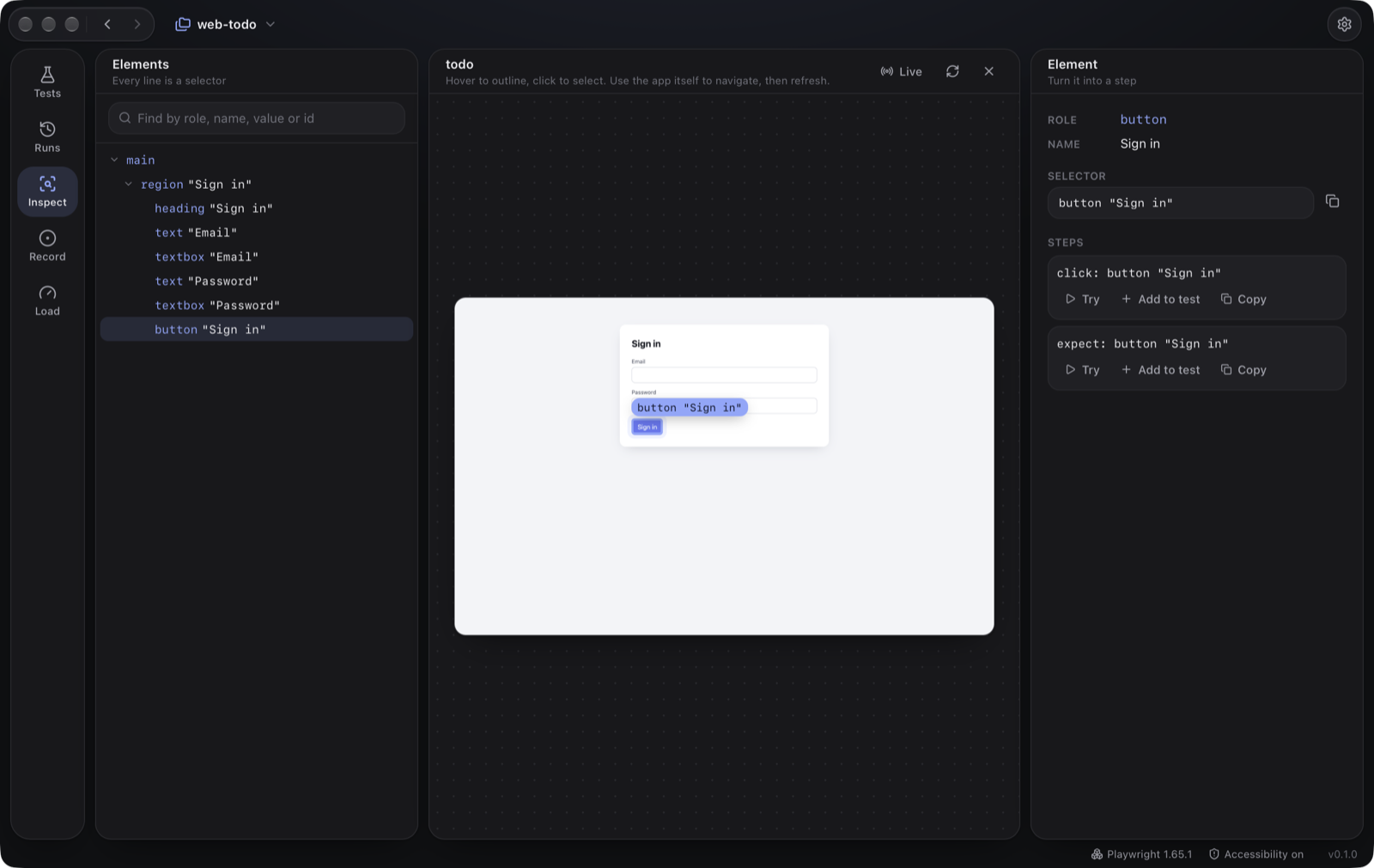
- Pick an app: one from your project, any URL, or a running desktop app (macOS).
- Find an element: click it on the screenshot, click its line in the tree, or search by role, name, value or id. Pick in app lets you hover the element in the real app instead (it is picked after 3 seconds).
- Get its selector: shown with a copy button. Every line of the tree is already a selector.
- Turn it into steps: Studio suggests steps for the element (a click, a fill with its value, a check). Try runs one on the live app right away; Add to test appends it to the open test; Copy copies it.
- Navigate by using the app itself, then refresh. Live refreshes every two seconds.
The command-line equivalent is sis inspect <app>, which prints the tree.
Elements the Inspector sees are remembered in .sisyphus/elements/, and the Source editor suggests them as you type. That folder is worth committing.
Made by  © 2026 Bussin Bytes Ltd · sisyphus.bussinbytes.io