
Reading a failure
A failure in Sisyphus is designed to answer three questions without running the test again: where did it fail, why, and what was on screen instead.
✗ Add, complete and delete todos 5.9s · tests/todos.sis.yaml at steps[7]:28 expect: button "Clear done" (enabled: true) ELEMENT_NOT_FOUND no visible element matches `button "Clear done"` did you mean: button "Clear completed" · button "Delete Milk" · button "Delete Eggs" · button "Delete Bread" · button "Sign out" screenshot: .sisyphus/runs/2026-11-15T14-47-10Z-0744/01-tests-todos/001-fail-steps-7.png tree: .sisyphus/runs/2026-11-15T14-47-10Z-0744/01-tests-todos/fail-steps-7.tree.yamlat steps[7]:28 is the step (the eighth, counting from 0) and its line in the file. If it failed inside a flow, you get the flow’s file and line too.
The error code says what kind of problem it is. The most common:
| Code | Means | Usually |
|---|---|---|
ELEMENT_NOT_FOUND |
Nothing on screen matches the selector | The text or label changed, or the screen isn’t the one you expected |
ASSERTION_FAILED |
The element is there but not as expected | Shows expected: and actual:; the app or the test is wrong |
AMBIGUOUS_SELECTOR |
Several elements match | Narrow it with >> or a more exact name; all matches are listed |
NOT_INTERACTABLE |
It’s there but can’t be used | Disabled, or covered by something (which is named) |
TIMEOUT |
A wait never came true | The app is slow or stuck |
APP_LAUNCH_FAILED |
The app didn’t start | Wrong path or URL, server not running |
PERMISSION_DENIED |
macOS blocked Sisyphus | Grant Accessibility; see Install |
All of them: Error codes.
What was there instead
Section titled “What was there instead”- did you mean lists the elements closest to what you asked for. Here,
button "Clear completed"is obviously the one: the label changed, or the test had it wrong. - The screenshot shows the screen at the moment of failure:
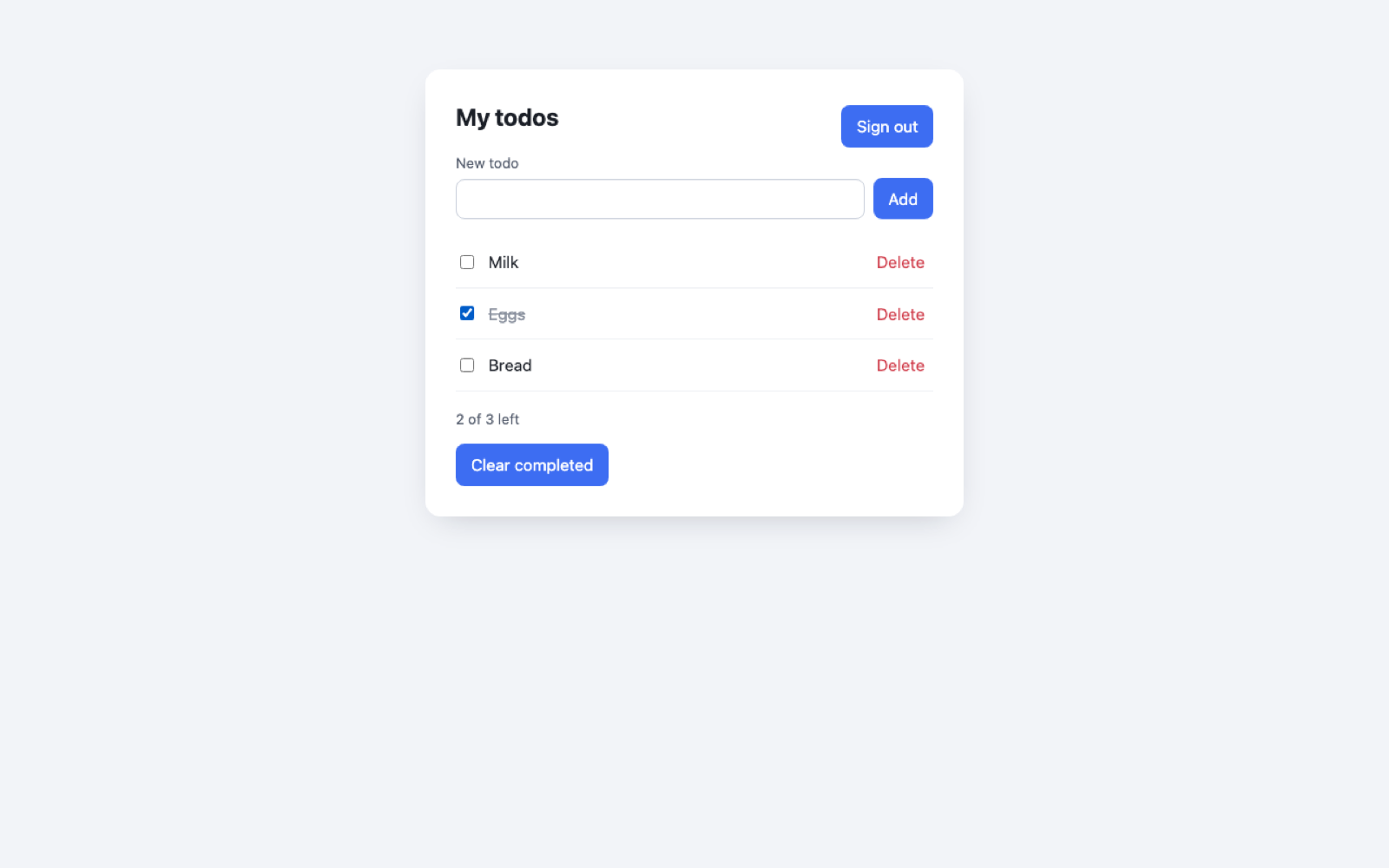
- The tree file lists every element that was on screen, starting with the part around the failure:
- list "Todos" - listitem "Milk" - checkbox "Complete Milk" - button "Delete Milk" = "Delete" - listitem "Eggs" - checkbox "Complete Eggs" [checked] - button "Delete Eggs" = "Delete"- status = "2 of 3 left"- button "Clear completed"Test bug or app bug?
Section titled “Test bug or app bug?”Ask: did the product change on purpose?
- The button was renamed on purpose → update the test. In Studio, the failed step offers the suggested selectors; picking one fixes just that step.
- Nobody meant to change it → you’ve found a regression. That’s the test doing its job.
In Studio
Section titled “In Studio”Failed steps are red in the editor and in Runs, with the error, suggestions, screenshot and tree right there. Retry a failed step after fixing it, or debug the test from that step. See Debugging.
For AI agents
Section titled “For AI agents”sis run --json gives the same information as compact JSON (step, line, error.code, nearest, artifact paths), so an agent can usually fix a selector in one go. See Tests with AI agents.
 © 2026 Bussin Bytes Ltd · sisyphus.bussinbytes.io